WordPress Social Software Platform Build Your Own Community Platform with WordPress For Free!
Social software platform powers everything from online communities to private membership platforms. Instead of relying on third-party platforms, you can now build and own your own community using tools like WordPress and plugins such as BuddyPress.
Social software refers to digital tools that enable users to interact, communicate, and build communities online through profiles, messaging, groups, and shared content.
What is Social Software?
Social software is a type of digital platform that enables users to interact, communicate, and build communities online through features like profiles, messaging, groups, and content sharing.
Benefits of Social Software?
Social software for WordPress transforms your website into an interactive, community-driven platform that boosts engagement and keeps visitors coming back. It encourages user-generated content, which can improve SEO rankings and increase organic traffic over time. At the same time, it helps build trust with your audience while creating opportunities for monetization through memberships, courses, and premium communities. Platforms built with tools like BuddyPress power thousands of online communities worldwide.
Types of Social Software Sites You Can Build with WordPress
- Social Networking Sites – Build a fully interactive platform where users can create profiles, add friends, post updates, and engage with content. Similar to Facebook or LinkedIn, this type of WordPress social software is ideal for creating niche communities that keep users coming back daily. These sites increase engagement, session duration, and repeat traffic.
- Online Communities & Forums – Create discussion-based platforms where users can ask questions, share advice, and build authority within a niche. Like Reddit, forums are excellent for SEO because they generate consistent user-generated content that grows your site organically over time.
- Membership & Private Communities – Develop exclusive, members-only communities where users gain access to premium content, private groups, and networking opportunities. This model is perfect for coaches, creators, and entrepreneurs looking to monetize their audience while building a loyal community.
- E-Learning & Social Learning Platforms – Combine online courses with built-in social interaction, allowing students to engage, ask questions, and collaborate. Platforms like Teachable and Kajabi have proven how powerful this model is for increasing course completion rates and user engagement.
- Content Sharing Platforms – Enable users to publish and share articles, videos, or images within your WordPress site. Inspired by platforms like Instagram and YouTube, these sites thrive on user-generated content and can scale quickly with the right niche and moderation.
- Professional Networking Platforms – Build a career-focused or industry-specific network where professionals can connect, collaborate, and share opportunities. Similar to LinkedIn, this type of social software works well for niche industries and B2B communities.
- Social Marketplace Communities – Create a platform where users can buy, sell, and interact within a community-driven environment. Like Facebook Marketplace, this model blends eCommerce with social interaction, increasing trust and conversions.
- Interest-Based Niche Communities – Focus on a specific topic such as fitness, crypto, travel, or parenting, and build a highly engaged audience around it. Niche communities often grow faster because they attract a targeted audience with shared interests and higher engagement levels.
- Event-Based Social Platforms – Build communities centered around events, allowing users to RSVP, network, and interact before and after live or virtual gatherings. This is ideal for conferences, masterminds, and local meetups.
- Messaging & Collaboration Platforms – Create real-time communication hubs where users can chat, collaborate, and share resources. Similar to Discord or Slack, these platforms are perfect for private groups, teams, and paid communities.
Social Software vs Social Media Platforms
Feature
- Ownership
- Monetization
- Customization
Social Software (Owned)
- ✅ Full control
- ✅ Unlimited
- ✅ High
Social Media (3rd Party)
- ❌ Platform controlled
- ⚠️ Restricted
- ❌ Limited
Core Features
- Custom Profiles
- Member Directory
- Members Profiles
- Member Profile Images
- Member Cover Image
- Profile Fields
- Profile Fields for Groups
- SEO Friendly
- Online Courses
- Groups Directory
- Group Settings/Roles
- Group Types
- Group Images
- Group Cover Image
- Internal Public/Private Email
- Sitewide Activity Stream
- Favorites
- Friends
- Blocking
- Reporting
- Suspending
- Locations by Google Maps
- Custom Login Screen
- Monetization
- Custom Registration
- Email Confirmation
- Friendships
- Friendship Requests
- External Email Notifications
- Custom Menus
- Member Admin
- And More…
💡 Why WordPress?
WordPress has been around for over 20 years and is the number one CMS system. Why not put a social software on an award winning platform?
Other reasons:
- Fully integrated with WordPress
- No coding required
- Scalable for small communities or large networks
- SEO-friendly structure
- Fast performance and clean UI
- Easy setup and customization
⚡ Launch Faster
Stop spending months building a social platform from scratch. With our social software solution, you can launch your own social network in a matter of minutes, not days or months.
Perfect for:
- Online communities
- Coaching programs
- Membership websites
- Niche social platforms
- Educational networks
- And More…
View Demo
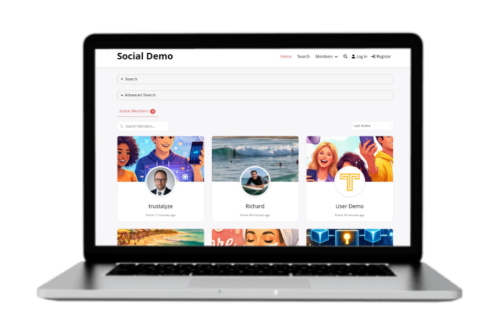
Test drive the Social Software Networking Demo. Keep in mind that the demo is reset each day so any new content you add will be reset every 24 hours.
Username: userdemo
Password: password01
We have built and compiled all of this into one social software application and it’s free. Once you download the social software solution, we will install it onto your domain. Once installed it will look like the social demo and you can login to your admin area and setup your social software network however you want.
Want Help Building Your Own Social Software Platform?
Instead of guessing your way through plugins and setup, you’ll follow a proven system to launch your social software platform faster and with fewer mistakes.
My coaching program shows you exactly how to build and launch your own social software platform using WordPress and tools like BuddyPress — without wasting time or money.
Our Reviews
Pretty Sweet
I thought I was going to pay an arm and a leg for a community software. Well, I didn’t. Thank you guys!
Great Solution
Installed this a few days ago and once it was installed it worked exactly how I wanted it to. A few little tweaks was all I needed! I searched for quite a while and can’t believe I found this. Thank you.
Response from Trustalyze Academy
Thanks for the review. We tried to include everything you need in it. If you need assistance down the road simply reach out…
Sure Beats Paying $1000
I was about to drop some serious coin on Ska but I found this by chance. This was exactly what I needed and you can’t beat free!
Response from Trustalyze Academy
Glad you liked it. Reach out for any questions.
Better Than Others
It won’t let me put the other brand I used before this. I paid $500 dollars for a POS that didn’t work right. It was slow, buggy it constantly frustrated me and my users. It was totally embarrassing. My only complaint with this solution is that it took a bit longer to convert my existing users.
Response from Trustalyze Academy
Thanks for the review Brandon. Sorry we don’t have a conversion tool to convert from another platform but we are working on one. I’m glad you got it converted. Reach out for any questions.
What I Wanted
I’ve been looking for a way to turn my WordPress site into a true social site, and this WP software exceeded all my expectations. Setup was fast and within minutes I had the features I wanted. I recommend this solution.
Easy Stuff
Blown away at how fast this was installed. You can’t beat the price. So far so good. I just didn’t know Wordpress could do this.
Response from Trustalyze Academy
Hey Alex, you’re very welcome. Let me know if you have any questions.
If you want to add a review to my coaching service, please contact me.
Frequently Asked Questions
How long does installation take?
If you want us to install it for you, please ensure your domain is fully resolved to your hosting. Installation takes about 5 minutes. Once installed, your site will look exactly like the demo. You can then customize it to your liking. It's WordPress so the possibilities are endless.
Can I install it myself?
Yes, when you get the social network solution, you will find the software download in the My Account area where you can download the file to your computer. Be sure you have a blank WordPress site for it will overwrite everything. If you want to install it yourself, download and install the All In One WP Migration into your WordPress site. Once you install that plugin, go to All-In-One WP Migration in the WP Admin area and choose Import. Then select the file that you downloaded from the My Account area. That will install the Social Networking Solution into your WordPress site.
Do you offer support?
We do offer support but keep in mind that only the plugin owners can modify their plugins. We can report a bug in the plugin and it's up to the plugin owner to update that plugin. We had made sure to use only recently updated plugins that work with the current version of WordPress.
Do you offer hosting?
We don't offer hosting but if you would like a really awesome hosting company, check out Hostinger. We use them and they are affordable and reliable.
Do I need to upgrade any of these plugins?
No, we have created this WordPress Social Network Solution using free WordPress plugins.
Getting and Retaining Users
Growing and retaining users for a social networking site isn’t about one trick—it’s about getting the right people, giving them a reason to stay, and building habits. Here’s a practical, no-fluff breakdown:
- Focus on Niche
- Solve a Problem
- Use Audience Piggybacking
- Making Onboarding Really Simple
- Build Engagement Loops
- Create Psychological Hooks
- Consistent Content = Growth Engine
- Turn Users Into Creators
- Build a "Reason to Return"
- Use Email Like a Weapon
Want to know specifics with each one? Contact Us.